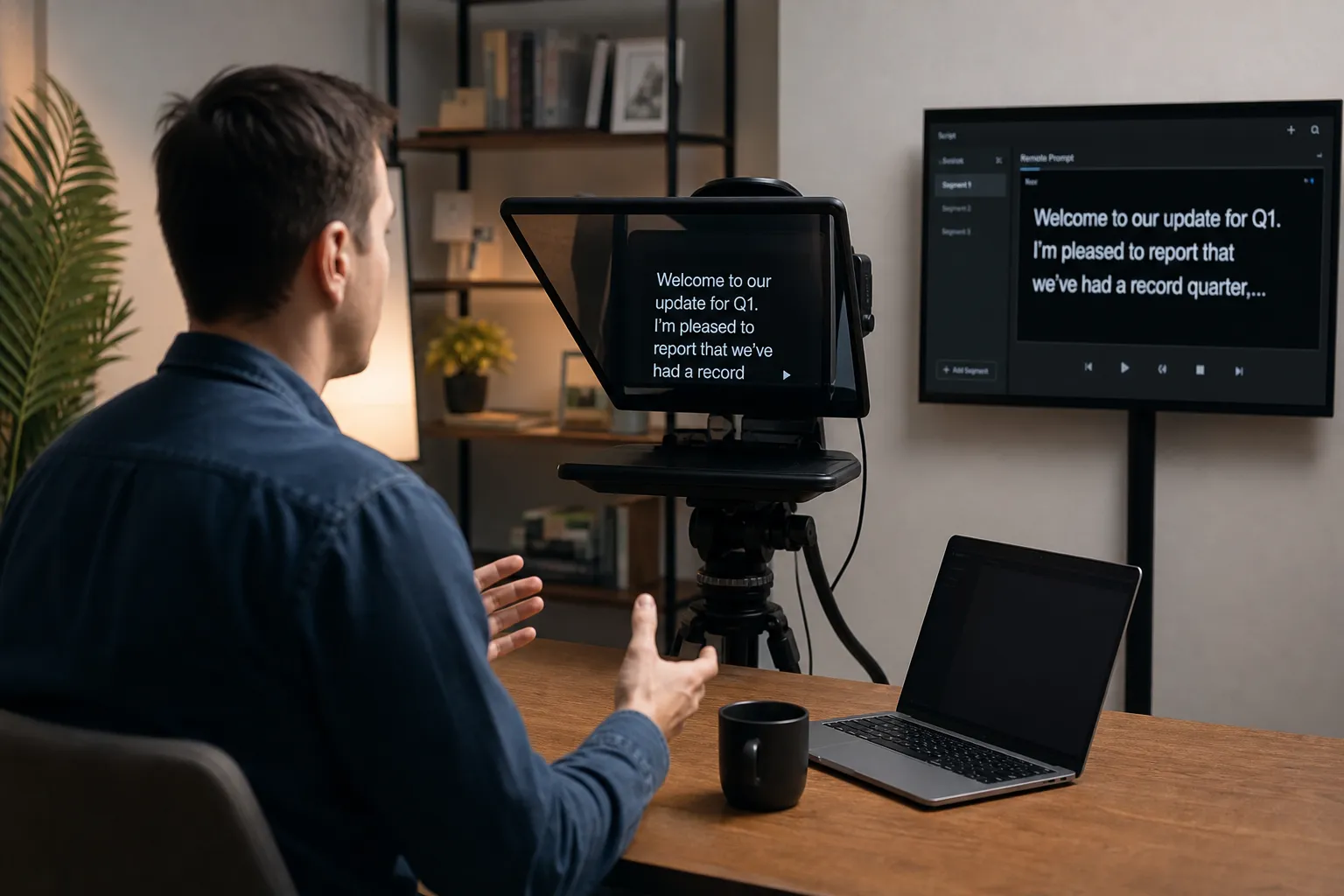
What is live remote prompting for video and how does it work? In simple terms: a teleprompter operator controls a scrolling script from a completely separate location, in real time, while a presenter records or broadcasts on camera. The operator is not in the room. The scroll speed is not fixed, and the presenter is not at the mercy of a pace that was set before anyone knew how fast they’d actually speak.
Much as we don’t like using teleprompters if at all possible, unless the presenter is used to them, but sometimes if you have to read a long set script or explain a complex document, they are necessary but there is a lot we can do to help, whether we are there while you shoot or remote. Ideally, if we can prompt you throughout and edit out any pauses, then great, but even if you have to broadcast live to a team or different business board, live prompting can be a life saver.
Traditional autocue setups have a reputation problem, and it’s well-earned. A camera-mounted script reader, a stranger standing next to the lens with a tablet, a scroll speed calibrated in advance and rarely adjusted mid-take, for trained media professionals, this works. For business owners, consultants, and solicitors who’ve never presented to a camera in their lives, it’s a recipe for stilted delivery and multiple retakes. At This Video Works, we can build live remote prompting directly into our filming service because removing the physical and psychological pressure of a traditional autocue setup produces noticeably better footage, faster.
This article explains how live remote prompting for video works from a technical and operational standpoint, it explains the basics like what tools you need, how to handle latency and security, and how to run a session from first prep to final take.
Our own services are very much geared to prompted filming and podcasts, my background in helping celebrities and CEO’s convey the right tone and tempo when being filmed translates perfectly to helping someone who isn’t used to speaking to camera, come over really well.
Ideally we do that live with you but that isn’t always possible and we can prompt and guide remotely, with or without the aid of a teleprompter. Having a familiar face on another screen guiding you really helps and as we will generally be editing the final footage there is no misunderstanding of what is needed. One area where we find it really useful and very cost effective is in producing short form video for social, when you are really tight on time and usually budget too, it’s very hard to get a short, punchy vocal out quickly and maintain your presence. Self shooting on a phone or camera of you own with someone guiding you via your iPad for example, can make all the difference and make sure you get the key points in.
Our services can be much more flexible than we cover in this article as it is more for general guidance than just working with us, and we usually create a workflow specific to you, you can upload video from your phone directly to Teleprompter, listed below, there is also a UK firm of the same name, both are very good and we use both, but our preference is to set you up ready to film and record, and connect to Blackmagic Cloud where the footage feeds straight into our edit studio and we can set you up with a live feed so you can see what your are filming.
We can advise on what you need and will work well for you and produce a very cost effective set up. Going further, this is the starting point for producing live podcasts where we can prompt and guide you through complex discussions, where we record fully edited versions to load after the event to your site and social media.
What live remote prompting for video actually means
A standard on-set autocue rig has a beamsplitter glass mounted in front of the camera lens, a display screen reflecting the scrolling script, and an operator physically present in the room managing the pace. The operator watches the presenter and adjusts manually, but they’re reacting a beat behind. The presenter knows someone is right there, the camera is rolling, and the script is moving whether they’re ready or not. That combination of pressure points is what makes traditional autocue counterproductive for non-media professionals.
Live remote prompting removes the operator from the room entirely. The script still scrolls on a screen the presenter can read, but the person controlling the pace is joining the session from a different location, via internet-connected software, and adjusting in real time based on how the presenter is actually performing. The “live” element is the critical distinction: this is not the operator setting a speed and walking away. They are watching the presenter throughout the session and reacting continuously.
The contrast with pre-recorded prompting is worth noting. In a pre-recorded session, mistakes can be cut in post, so timing pressure is lower and the operator’s role is less reactive. In a live or live-to-camera session, the operator’s responsiveness directly affects the quality of the take. There is no edit to save you.
How live remote prompting works: roles and real-time coordination
A well-run live remote prompting session has four distinct roles, and keeping them separate is important.
- The presenter reads from the display screen and focuses entirely on delivery, not on managing the scroll.
- The prompt operator joins the session remotely, controls play, pause, speed, and position via a browser or app on a separate device, and adapts continuously to the presenter’s pace.
- The director or producer oversees the run-of-show, manages cues, coordinates any last-minute script changes, and keeps the session on schedule.
- Technical support handles the pre-session checks: connectivity, display settings, font size, sync speed, and contingency planning.
The technical architecture behind a live session typically uses a two-link model. One link sends the script display to the presenter’s screen; a second, separate link gives the operator remote control of the scroll. These are different URLs or access points within the same platform, which means the presenter cannot accidentally control their own scroll speed, and the operator cannot see distracting presenter-facing UI elements during a take.
The operator monitors the presenter’s performance via a live video window, an earpiece, or a shared production monitor, depending on the setup. Their job is entirely reactive: speed up when the presenter finds their rhythm, slow down when they pause to gather a thought, hold position when they restart a sentence. The operator is essentially a real-time editor of pace, and that’s what makes this approach so much more effective than a fixed scroll speed set before the session begins. Some setups also use IFB (interruptible foldback) earpieces, which allow the director to feed live cues to the operator or presenter without breaking the take, a useful addition for complex or high-stakes recordings.
The tools that power remote prompting sessions
Several cloud-based platforms support live remote prompting to varying degrees, and the differences matter when you’re choosing one for a professional shoot.
Teleprompter.com
Teleprompter.com is currently a strong match for live remote prompting workflows. It explicitly supports playback control from a second device, remote script editing during a session, cloud sync, and live streaming to major platforms. The free Starter plan includes basic remote control functionality; the Pro plan, priced at approximately $19.99 per month (or around $7.50 per month on an annual billing cycle), adds advanced remote control features. For most professional production contexts, the Pro tier is a sensible starting point, particularly if you need multi-device control or reliable live-stream integration.
Speakflow
Speakflow uses voice-activated scrolling and syncs scripts across devices, which suits distributed workflows, although its remote control features are less explicitly documented than Teleprompter.com’s.
VODIUM
VODIUM is designed for remote teams using conferencing tools, making it a reasonable choice for stable overlay control in video calls.
CuePrompter
CuePrompter is a budget-first option with limited remote control capability. It works for simple pre-recorded single-operator sessions but may lack the features needed for live remote coordination where the operator must respond to a presenter in real time.
Before committing to any tool, ask four questions. Does it provide a separate remote control link and a separate display link? Does it support real-time script editing mid-session without disrupting the scroll? Is sync reliable at varying connection speeds? And what are the data storage and privacy settings, particularly relevant if your scripts contain commercially sensitive content and you’re subject to UK data protection obligations?
Technical requirements for a reliable session
Bandwidth and latency
The bandwidth demand for a teleprompter control stream is low: you’re transmitting text and scroll commands, not video. A 5 Mbps connection handles the sync reliably, with 10 Mbps providing comfortable headroom. What matters far more than raw speed is latency. For scroll control to feel responsive, target round-trip latency under 50 ms. Above 200 ms, the operator’s input creates a noticeable lag between their action and what appears on the presenter’s screen, which disrupts the pacing feedback loop the whole setup depends on.
Connection checklist
Where possible, the operator should use a wired ethernet connection rather than Wi-Fi. The presenter’s setup should include a backup mobile hotspot in case their primary connection drops mid-session. Run a full technical rehearsal well before the session begins, checking sync speed, font size, margins, and section markers at the same time. Problems discovered during a rehearsal are fixable; problems discovered during the first take are not.
Security and GDPR
Security is a practical concern that often gets overlooked in pre-production. Scripts for professional services clients frequently contain unreleased messaging, commercially sensitive positioning, or personal references. Before uploading any script to a cloud-based tool, check where the data is stored and processed. For UK businesses, confirm whether the platform operates under GDPR-compliant infrastructure, because storing personal data on a non-compliant third-party platform creates regulatory exposure regardless of how the data is being used. Treat the operator control link the same way you’d treat a shared login credential: distribute it only to the people who need it, and revoke access after the session.
For highly confidential shoots, tools with end-to-end encryption or on-premise deployment options offer a more defensible data handling position than public cloud platforms. This is not an edge case for professional services firms:solicitors, financial advisers, and accountants regularly produce video content that touches client relationships, regulatory requirements, or strategic positioning. The GDPR question should be on the pre-production checklist, not an afterthought.
Why business video shoots are switching to this approach
Most business owners are not trained presenters. Put a non-actor in front of a camera with a fixed-scroll teleprompter, a stranger operating it two metres away, and the awareness that every stumble is costing production time, and you’ve created exactly the conditions that produce stilted, scripted delivery. The person on screen is not thinking about what they’re saying; they’re thinking about keeping pace with a script they didn’t write and a machine they can’t control.
Live remote prompting changes the dynamic in a specific way: the presenter is no longer chasing the script. The script follows them. That single change often improves how people perform on camera in ways that are immediately visible in the footage. They pause when they need to. They rephrase naturally when a sentence doesn’t sound right in their mouth. They look up, make eye contact with the lens, and speak rather than read.
This Video Works builds live remote prompting into its conversational, prompt-led filming approach for exactly this reason. Rather than handing a client a full script to scroll through in one take, we prompt throughout to guide presenters through key points during filming, keeping delivery natural and unhurried. For professional services clients, where personal credibility and authentic communication are central to winning client trust, this experience is the approach that consistently outperforms anything that looks or sounds scripted. Remote coordination also means prompts and questions can be adjusted mid-session without physically disrupting the presenter’s environment, which keeps the energy of a take intact even when the direction changes.
Setting up a remote prompting session: from prep to final take
Preparation is where a remote prompting session succeeds or fails. Finalise and format the script in your chosen tool before the session begins. Use clear section breaks and pace markers so the operator has reference points throughout. Assign the four roles in advance and confirm them with each person: the operator and director should never be the same person during a live session, because the cognitive load of watching the presenter, managing the scroll, and overseeing the production simultaneously is too high to do any of them well.
Send the display link to the presenter’s screen and the control link to the operator well before the session starts. Test both. Confirm font size and scroll speed baseline with the presenter during the rehearsal run, not after the camera is rolling. Check that the presenter can read the display comfortably from their camera distance without leaning forward or squinting, because any physical adjustment to read the screen will show on camera.
Start the live session with a short rehearsal take to calibrate scroll speed to the presenter’s natural pace. This is not wasted time; it saves retakes later. The operator maintains a live video window of the presenter throughout the session, and that window is the primary feedback loop for every pacing adjustment they make. When the presenter pauses, ad-libs, or restarts a sentence, the operator holds or rewinds without waiting for a cue from the director. The operator’s responsiveness is the mechanism that makes the whole setup work.
After the session, the recorded content moves into editing. Because the delivery was guided in real time and the presenter was not fighting a fixed scroll speed, fewer retakes are typically needed, a pattern the team at This Video Works observe consistently across shoots. That means less time in the edit suite, less time asking the client to schedule another session, and a final product that reflects how the presenter actually speaks rather than how they read.
Live remote prompting for video: accessible, practical, and worth building in from the start
Understanding what live remote prompting for video is and how it works comes down to this: real-time, off-site control of a teleprompter script, with an operator who adapts to the presenter’s pace as filming happens. The technology behind it is accessible, a cloud-based platform, two session links, a stable connection under 50 ms latency, and four people who know their roles.
The barrier to entry is lower than most production teams assume. Cloud tools have made this remote prompting workflow available to small and medium-sized teams without specialist hardware. The shift that matters most is not technical but behavioural: when a presenter is freed from pacing anxiety and script pressure, the quality of what ends up on screen improves in ways that no amount of post-production can replicate.
If you’re planning a business video shoot and the thought of a traditional autocue setup gives you pause, live remote prompting is likely a better fit for how you naturally communicate. If you want to explore how it fits your next shoot, the team at This Video Works runs sessions built around exactly this kind of brief, contact Nick directly to find out more.